Skip to content
Wex Advisory

Automated reporting · for small and mid-sized businesses

Automated reporting
for the report someone rebuilds by hand.

Owners, finance, ops and sales teams send me the report they rebuild every week or month. I build it once so it runs on its own: data pulled from your tools, a plain-English summary of what changed on top, delivered by email, PDF or Excel. Free for 30 days on your real data, then $1,000 setup and $300 a month.

Free · 30 minutes · no pitch
Built for a 5-location coworking operator and a wholesale + DTC brand.

In short

Automated reporting means a report someone builds by hand every week or month is built once and then runs on its own: the data is pulled from the tools you already use, checked, summarized in plain English and delivered by email, PDF or Excel. I build these for small and mid-sized businesses. It runs free for 30 days on your real data; if you keep it, it's $1,000 setup and $300 a month, which covers upkeep and up to 2 hours of changes.

What it looks like

Different teams, the same job: data in, a report out, nobody rebuilding it by hand.

Three of these were built for clients, with figures blurred because it is their data. The last is an example of the same pattern for another team.

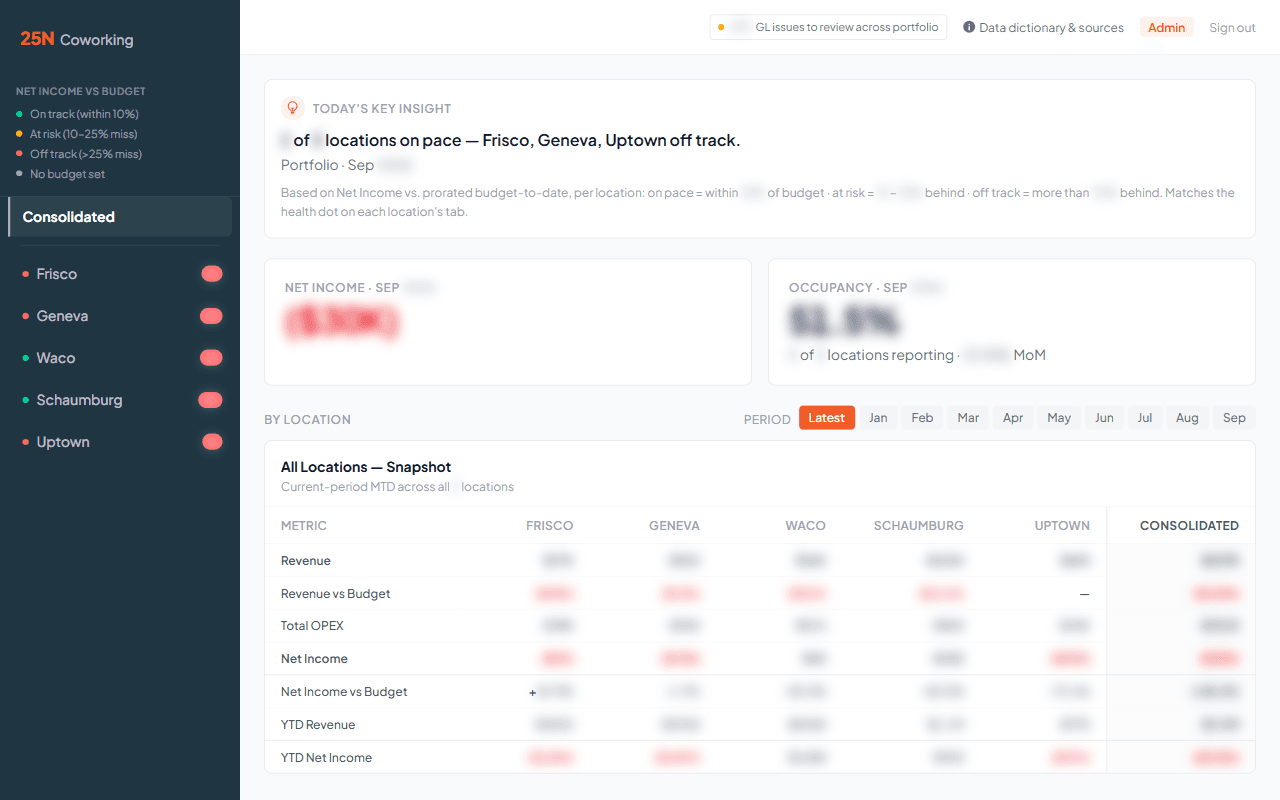
  • 25N Coworking reporting system, figures blurred
    Finance · 25N Coworking

    Month-end close for a 5-location coworking operator

    Before

    • Month-end close reconciled by hand in Excel
    • Repeated for each of 5 locations

    After

    • GL export arrived by email and was checked against the rules automatically
    • Finance dashboard refreshed daily with GL and occupancy
    • PDF and Excel close packet built for every location
    • A short key insight written at the top each day

    Delivered as: Dashboard, PDF and Excel packets
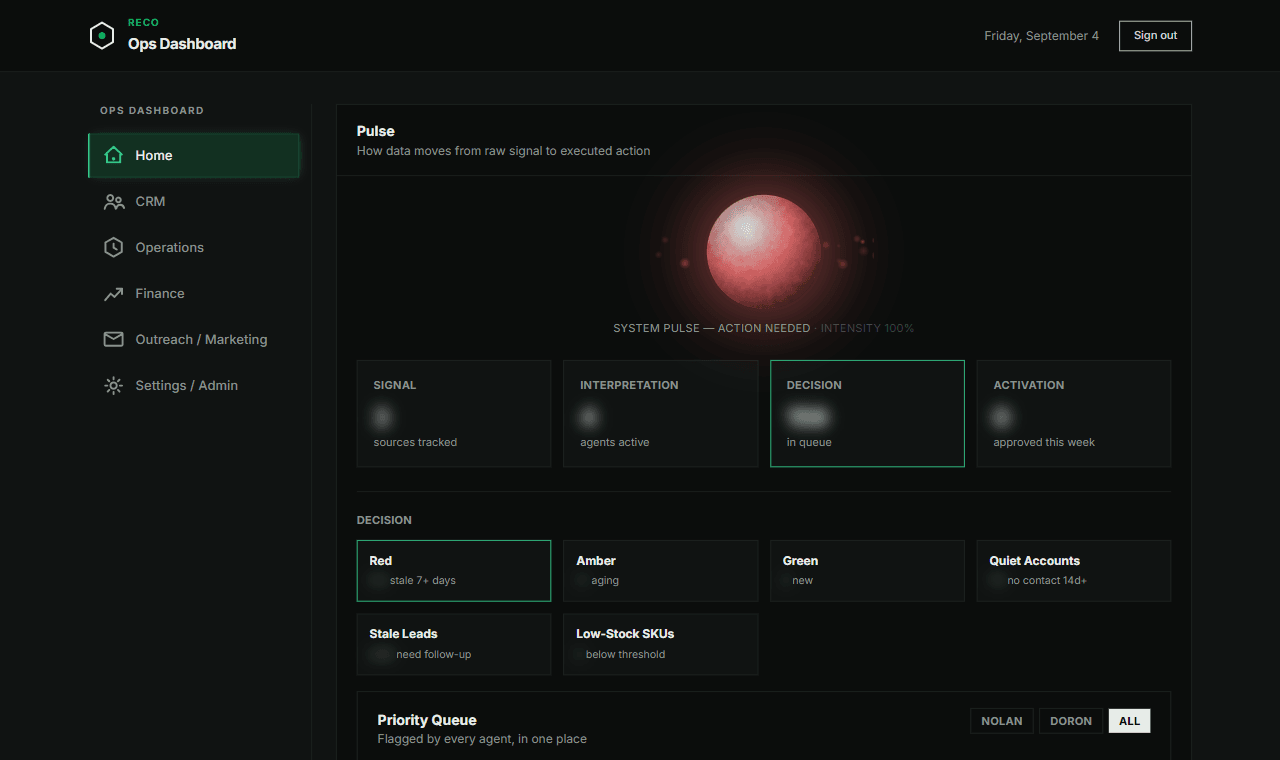
  • RECO reporting system, figures blurred
    Sales · RECO

    Wholesale pipeline for a two-founder brand

    Before

    • 119 wholesale accounts and 2,500+ sales leads lived in a Google Sheet
    • No engineering staff to build anything better

    After

    • One live dashboard with every account and lead
    • Live Shopify sync
    • 5 automated agents
    • A daily priority digest by email

    Delivered as: Live dashboard and a daily email digest

  • Accounting · RECO

    Monthly financials for the founders

    Before

    • The monthly numbers lived only in a founder's Excel file
    • Shared by email or by opening the file

    After

    • He uploads the file on the dashboard's finance tab
    • Checked automatically: required sheets present, balance sheet balances, no missing months
    • A preview of new and revised months, then publish
    • Every upload kept for one-click rollback

    Delivered as: Finance tab on the live dashboard

  • OperationsExample

    Weekly project status for a services firm

    Before

    • A manager copies status from the project tracker into a document
    • Chases missing updates by email
    • Sends the summary every Monday

    After

    • Status pulled from the tracker automatically
    • Overdue items and blockers flagged
    • A plain-English summary written on top
    • Delivered to the leadership inbox every Monday morning

    Delivered as: Email, with a PDF attached

For finance teams

Automated financial reporting

Finance is where most hand-built reports live: the month-end close, budget against actual, the packet that goes to the owner or the board. Automated financial reporting takes the exports your accounting system already produces and turns them into those reports on a schedule, checked before anyone reads them.

At 25N Coworking, a GL dashboard put every location's P&L in one place, with revenue and NOI against budget, month-over-month variance flags, a six-month trend and a plain-English summary for each location whenever new data landed. A GL check flagged entries that broke per-account rules before the close, and a month-end packet (income statement against budget, balance sheet, cash flow, AR and AP aging) was generated for every location as PDF and Excel.

At RECO, the founders' own monthly Excel model feeds the dashboard's finance tab, and a month is published only when its balance sheet balances.

The AI part

A plain-English summary of what changed, at the top of every report.

Numbers tell you what happened. The summary tells the reader where to look: what moved, the likely reason, and what is worth acting on this week. It is written from the same data as the report. 25N's finance dashboard opened with one every day.

What changed this week
Sample
  • Revenue rose on last week, almost all of it at the Eastside location.
  • No-shows jumped at Midtown midweek. Both days had a new scheduler on shift.
  • Two invoices more than two months overdue are now the largest open items. Worth a call this week.
Sample summary for a fictional three-location clinic

How it works

From one report on your desk to one that runs itself.

Each step ends with something you can hold me to.

  1. Send me the report

    A screenshot or a description is enough: what it shows, who reads it, where the data comes from.

    Output: What I'd automate, and the price in writing.

  2. Connect the sources

    I connect the tools and files the report draws on, so nobody copies data by hand.

    Output: Data pulled automatically and checked before it's used.

  3. Build the report and summary

    The report builds itself on your schedule, with a plain-English summary of what changed and why at the top.

    Output: The first automated report, delivered where you already read it.

  4. Hand off

    Your team learns to run it without me, and I stay on call for changes.

    Output: A recorded one-hour walkthrough, a written guide and a quarterly refresher.

Where the data comes from

Tools I've connected in client work

  • Excel
  • Google Sheets
  • QuickBooks
  • Shopify
  • Yardi GL exports
  • Emailed exports (Gmail)
  • Notion

And similar tools: HubSpot, Salesforce, Xero, Slack, or anything that exports a file or has an API.

Where the report lands

Where your team already looks

  • Email
  • PDF
  • Excel
  • Live dashboard
  • Slack(can do)

Most readers never log in to a dashboard, so the report goes to them.

Pricing

What automated reporting costs.

Free30-day trialOn your real data. The price and the day-30 date are in writing on day one.

$1,000SetupOnly if you keep it. Half at signing, half at go-live.

$300/moMonthlyFounding price. Upkeep and up to 2 hours of changes a month.

Extra hours are $150. 3-month minimum, then month to month.

Free, no call needed

Send me one report

Tell me about one report your team builds by hand. I read every one myself and reply within 24 hours with how I'd automate it. A description is enough; leave out any sensitive numbers.

Questions

Automated reporting, answered

Which tools can you pull data from?

In client work I've connected Excel, Google Sheets, QuickBooks, Shopify, Yardi GL exports, emailed exports and Notion. Anything that exports a file or has an API, like HubSpot, Salesforce or Xero, can usually be connected too.

How much does automated reporting cost?

It runs free for 30 days on your real data, and the price is in writing on day one. If you keep it, it's $1,000 setup (half at signing, half at go-live) and $300 a month, which covers upkeep and up to 2 hours of changes. Extra hours are $150.

How long does it take?

Most reporting builds take 5 to 20 hours of work, so it is usually running on your own data inside the free 30-day trial. At 25N Coworking the first working delivery came 9 hours after kickoff.

What if our data is messy?

That's normal. The data is checked before anything is built on it, and the report flags problems instead of hiding them. RECO's finance tab, for example, won't publish a month unless the balance sheet balances.

Does my team have to change how it works?

No. The report arrives where people already look, by email, PDF or Excel, so readers don't need a new login. The person who used to build it gets that time back.

Who maintains it after launch?

I do. The $300 monthly covers upkeep and up to 2 hours of changes a month; extra hours are $150. Every build also comes with a recorded walkthrough and a written guide so your team can run it.

Rather walk me through it?

Bring the report to a call and I'll tell you what I'd automate first, whether or not you hire me.